Welcome then! I hope you’re enjoying the software so far 
@antony already showed you a very good way, I’d like to demonstrate yet another (Visual Paradigm is extensive like that, there are often more than one solution to a problem!  ).
).
See, the repository which Antony showed above can also be used “on the fly”. And all it takes is pressing control-space instead of entering a name for your model element:
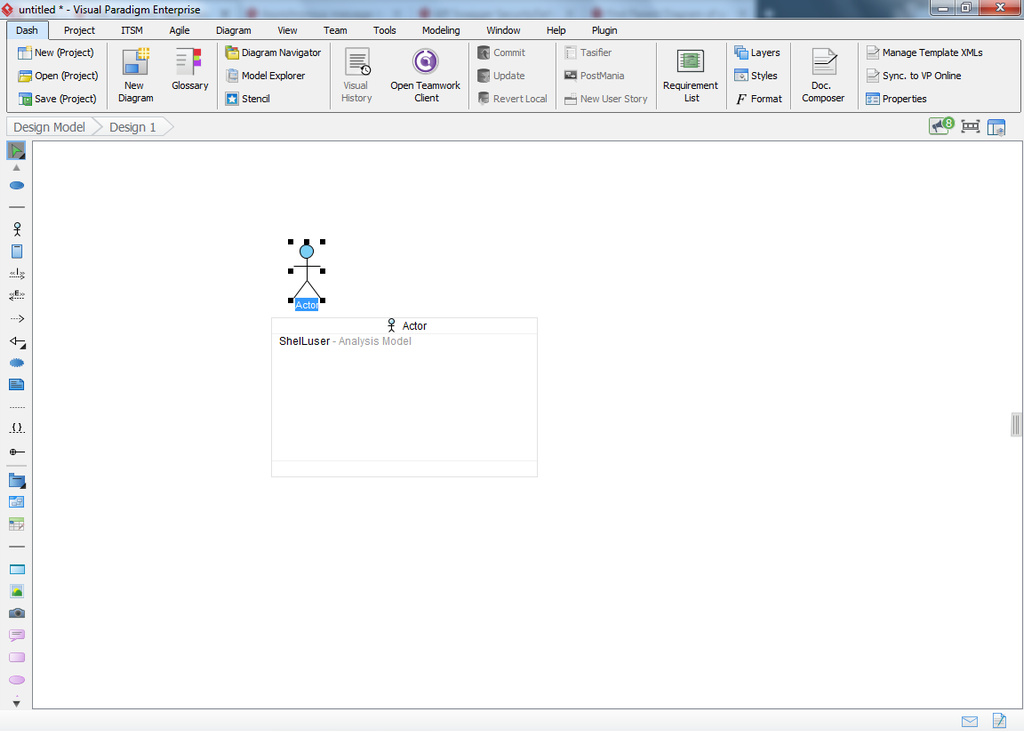
In this project I just made a (small) Use Case diagram in another model (using the project browser’s ‘Model structure’ tab), and in the picture above I’m starting a new diagram. I double clicked on the canvas to open the Resource Catalog, I selected the actor model but then I did something special: instead of entering a new name I pressed control-space, see above.
What this does is list every other related model element in your project. In my case this is an actor I named after myself. So if I want to re-use this element all I have to do is press cursor down to select it, and press enter (or you can click on it too of course).
This is an even faster way of reusing your items. And the best part (in my opinion) is that you don’t even have to think about what to use, because VP will ensure that you only get to see relevant models.
Hope this can help too!
